For product and release teams that write for customers
Customer-facing changelogs from Azure DevOps
Publish changes in your customers’ language while keeping technical work item titles for your team. Write the release note in a custom field, select the changes for this release and review them in Bravo Notes. Export HTML for your website, Markdown for a Wiki or a PDF to share by email.
30 days, every feature, no credit card. The trial does not convert into a paid plan automatically.
Keep customer wording alongside the work item
A technical ticket title rarely explains what changed for a customer. Store that explanation in a release note field while the work is fresh. The changelog template uses that field, so you can review the customer wording together before publishing.
What goes into the document
- Customer-facing wording from a release note field, reviewed by your product or release team.
- Sections for new features, improvements and fixes, sorted by label rules.
- Product, version and support contact from parameters.
- HTML for a help center or website, Markdown for a Wiki, PDF for the customer email.
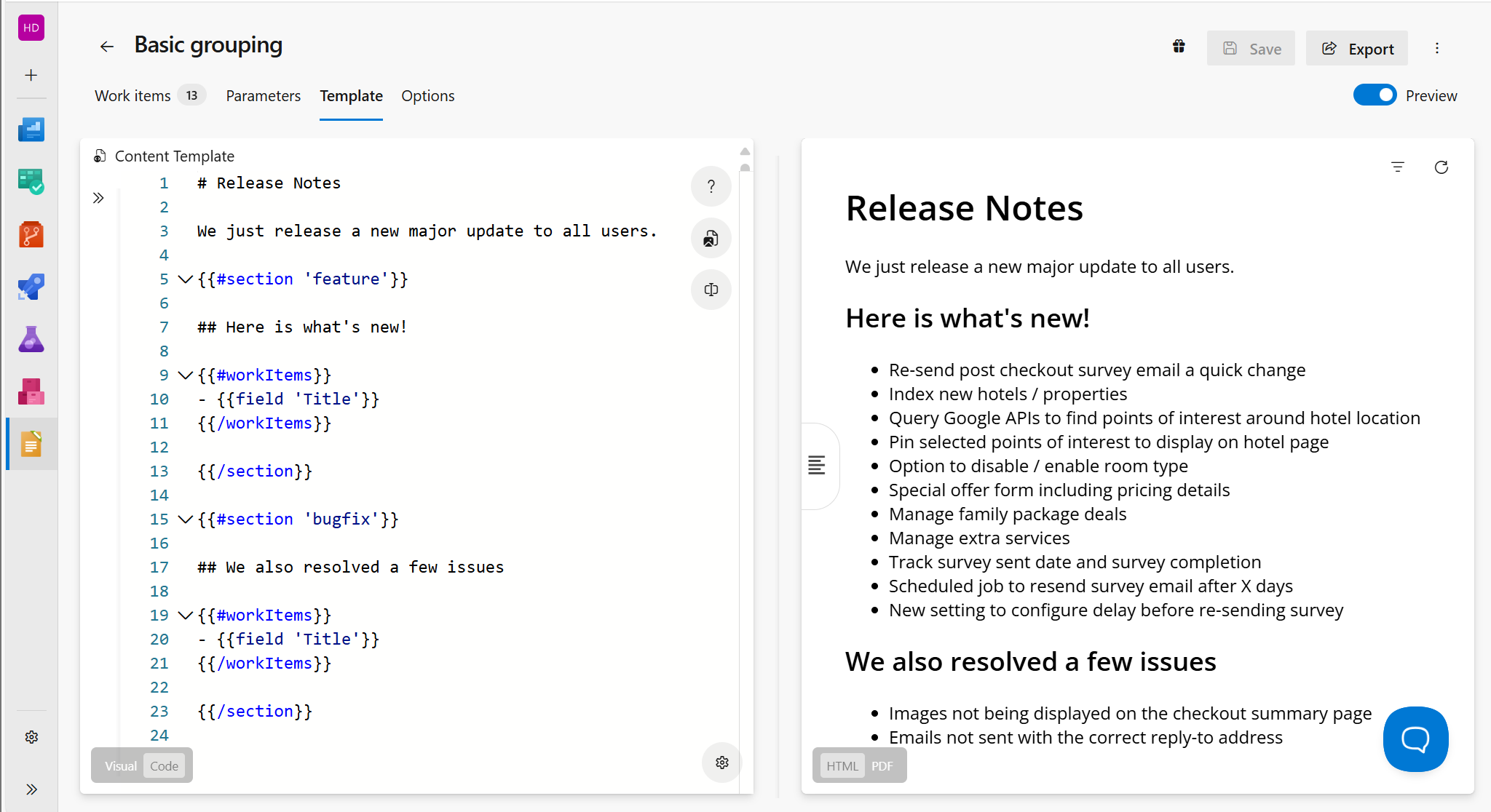
Build the document in Azure DevOps
Step 1
Add a release note field
Ask your process administrator to add a Release note field to the work item types you use. Write what changed for the customer in that field. Leave it empty for work you do not want in the changelog.
Step 2
Select and review the changes
Save a query that selects the release and items with a filled-in release note field. Use the completed states and field type supported by your process. Review the results for customer suitability; a filled-in field is not an approval step.
Step 3
Render and publish
The template prints the release note field and never the title. Preview, fix wording in the work item, refresh, then export HTML or Markdown for your site, or email the PDF to customers.
Next time
Select the next release and update the version parameter. Review the wording stored on those work items, then export with the same sections and layout.
Starter template
Paste this on the Template tab. Replace Custom.ReleaseNote with your field reference name and create the labels below. These example rules use User Story and Bug; adapt them for Product Backlog Item or custom types. Select only the release you intend to publish, exclude empty release notes and review the preview for internal information.
Paste into the Template tab
# What's new in {{ param 'ProductName' }} {{ param 'Version' }}

{{ date format='d mmmm yyyy' }}

{{#section 'new-feature'}}
## New features

{{#workItems orderBy='Priority'}}
{{{ field 'Custom.ReleaseNote' }}}
{{/workItems}}
{{/section}}

{{#section 'improvement'}}
## Improvements

{{#workItems}}
- {{{ field 'Custom.ReleaseNote' }}}
{{/workItems}}
{{/section}}

{{#section 'bugfix'}}
## Fixes

{{#workItems}}
- {{{ field 'Custom.ReleaseNote' }}}
{{/workItems}}
{{/section}}

Questions? Contact {{ param 'SupportEmail' }}.
Labels to create on the Work items tab
| Label | Rule |
|---|---|
new-feature | Work Item Type = User Story and Tags contains new-feature |
improvement | Work Item Type = User Story and Tags does not contain new-feature |
bugfix | Work Item Type = Bug and State = Closed |
Parameters to fill in on the Parameters tab: ProductName, Version, SupportEmail
Start with fields, sections and linked items in the syntax reference.
Example document excerpt
What's new in Orderflow 4.12
11 November 2026
New features
You can now export your filtered invoice list to CSV from the Invoices page.
Improvements
- Order search now matches partial order numbers.
Fixes
- Editing an order no longer clears its delivery address.
- Orders with a missing shipping address no longer fail at checkout.
Questions? Contact support@orderflow.example.
Illustrative excerpt with fictional work items. This is not a captured Bravo Notes export; your template, data and export settings determine the final document.
We currently build your first custom template for free during your trial.
Contact us“We adopted Bravo Notes about a year ago to publish release notes for our software. It's allowed us to heavily automate our processes and publish our release notes quickly, accurately, and stylishly.”
What you need
- Any Bravo Notes subscription plan. Sending the export by email is included from Professional, publishing to Confluence from Business.
- A release note field on your work item types, added by a process administrator.
- A selection for the release, filtered to items with customer wording. Query operators depend on the custom field type; check the results before publishing.
Plans apply to one Azure DevOps organization and include named seats for document creators. Readers of exported files do not need a Bravo Notes license. Links back to work items still require Azure DevOps access. Compare plans.
Frequently asked questions
- Do we have to rewrite our work item titles?
- No. Titles stay technical for triage and code review. The customer wording goes in the release note field, and the template prints only that field.
- How do we keep internal work out?
- Exclude internal items from your selection and leave their release note field empty. An audience field such as Customer or Internal can help you filter. Review the preview before publishing; neither a label nor a filled-in field is a confidentiality check.
- Can we publish straight to our website or help center?
- Export HTML and place it on your site or help center, or let the build task publish Markdown to a Wiki, a repository or Confluence. Bravo Notes does not host a public changelog page itself.
- Does this workflow require AI?
- No. This template uses wording stored in your release note field. Your team writes or reviews that wording before publishing. Bravo Notes also has restricted-preview AI features; they are not required for this workflow or generally available to every organization.
Go deeper
Try customer-facing changelogs with your own work items
Install Bravo Notes in your Azure DevOps organization. Start with a small selection of work items, adapt the template above and check the preview before exporting your first document.
Start free trial30 days, every feature, no credit card. The trial does not convert into a paid plan automatically.
Compare plans